
Introduction
When a Philips nose trimmer making loud noise disrupts a standard grooming routine, the cause is typically mechanical resistance rather than internal motor failure. Most acoustic issues are resolvable within minutes through systematic maintenance.
Modern Philips grooming hardware is engineered for low-decibel operation, where a smooth, consistent hum is the baseline. However, the emergence of rattling, grinding, or high-pitched whining indicates an interference within the internal rotary system.
This comprehensive analysis provides technical insight into:
- Determining the necessity of deep cleaning.
- Identifying blade alignment requirements.
- Assessing battery voltage influence on motor torque.
- Recognizing mechanical end-of-life indicators.
- Establishing a protocol for safe troubleshooting.
Ensuring the device remains functional for its intended lifespan.
How the Rotary Nose Trimmer Mechanism Works
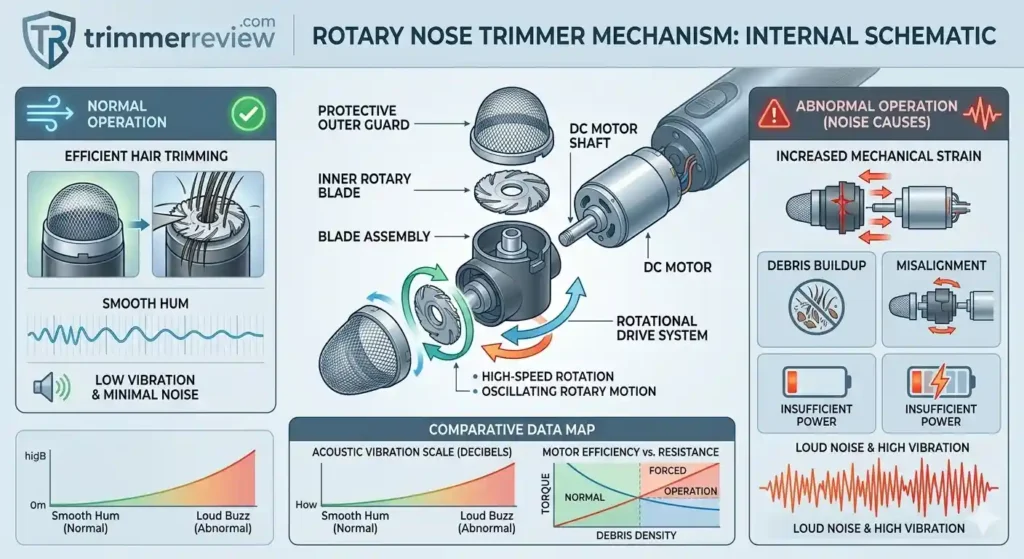
- Philips nose trimmers use a compact rotary cutting system designed for safe grooming in sensitive areas. The mechanism consists of several small components working together to produce smooth and controlled trimming.
- The inner rotary blade performs the cutting action by rotating at high speed. This blade sits inside a protective outer guard, which allows hair to enter while preventing direct contact with the skin.
- Power is supplied by a small DC motor shaft, which transfers rotational motion to the blade assembly. As the motor spins, the blade performs an oscillating rotary motion, trimming hair efficiently while maintaining low vibration and minimal noise.
- When any part of this system experiences resistance—such as debris buildup, misalignment, or insufficient power—the motor must work harder. This additional mechanical strain is one of the primary reasons a nose trimmer may begin producing abnormal noise.
Technical Glossary
Rotary Blade System
A circular cutting mechanism where an inner blade rotates inside a protective outer guard.
Motor Torque
The rotational force generated by the DC motor to drive the trimming blades.
Acoustic Vibration
Mechanical vibration transmitted through the housing that becomes audible during operation.
Quick Noise Diagnosis Table
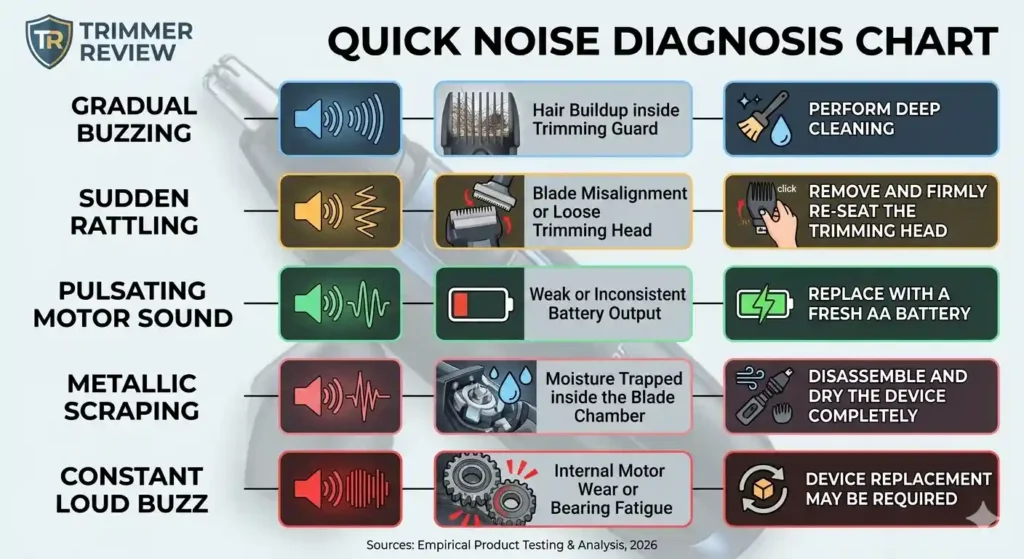
- Diagnosing the source of abnormal noise in a Philips nose trimmer does not always require a full mechanical inspection. In many cases, the type of sound produced by the device provides a strong clue about the underlying issue.
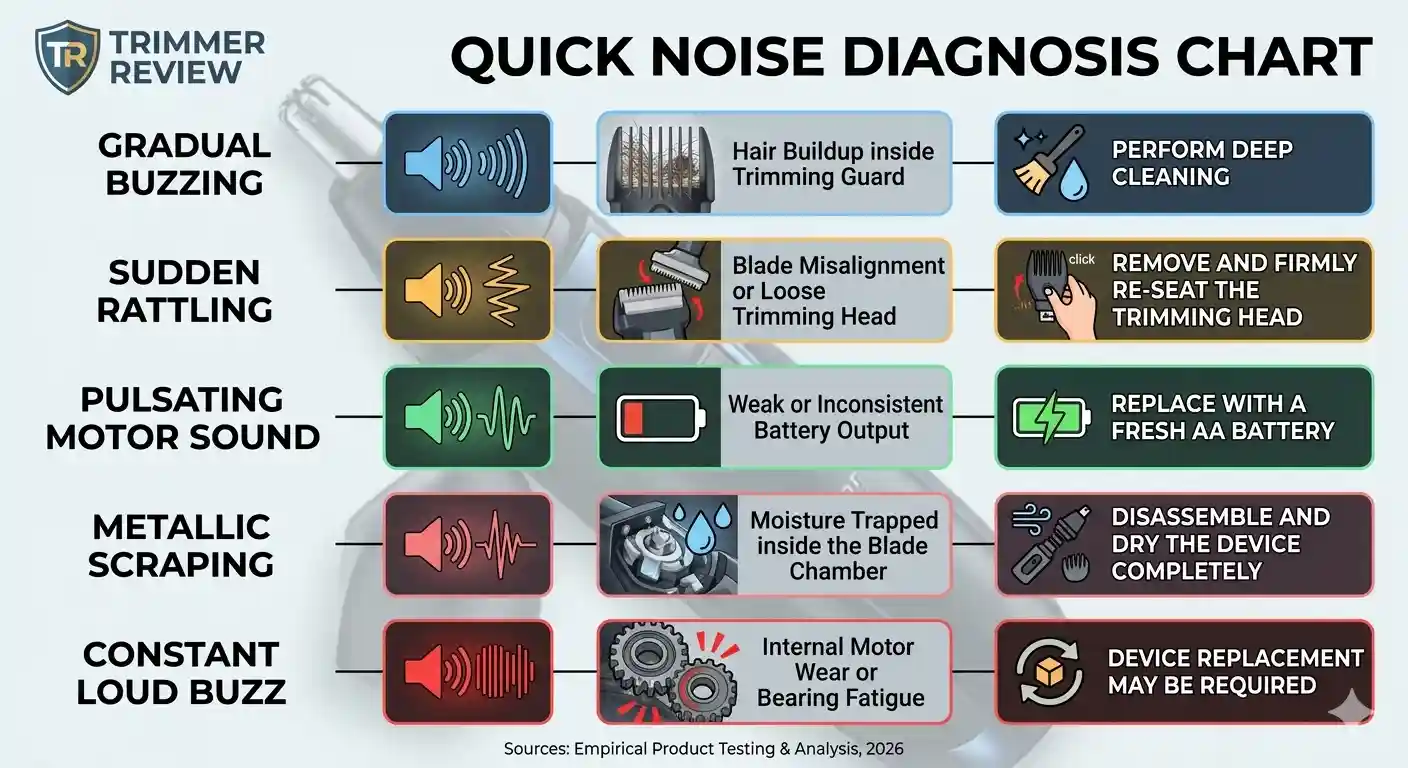
- The quick reference table below summarizes the most common noise patterns observed in Philips Series 1000, 3000, and 5000 trimmers, along with their likely mechanical causes and the most effective corrective action. Using this diagnostic overview can help identify whether a simple cleaning procedure, battery replacement, or component realignment is required.
| Noise Type | Likely Cause | Quick Fix |
|---|---|---|
| Gradual buzzing | Hair buildup inside trimming guard | Perform a deep cleaning of the trimming head |
| Sudden rattling | Blade misalignment or loose trimming head | Remove and firmly re-seat the trimming head |
| Pulsating motor sound | Weak or inconsistent battery output | Replace with a fresh AA battery |
| Metallic scraping | Moisture trapped inside the blade chamber | Disassemble and dry the device completely |
| Constant loud buzz | Internal motor wear or bearing fatigue | Device replacement may be required |
Root Causes: Why a Philips Nose Trimmer Starts Making Loud Noise
Most hardware in the Philips Series 1000, 3000, and 5000 utilizes a compact DC motor to drive an internal rotating blade within a protective guard system. When mechanical resistance increases, the resultant vibration echoes through the plastic housing and becomes audible.
An instance of a Philips nose trimmer making loud noise typically falls into one of five technical categories:
- Debris Accumulation: Keratin and hair fragment buildup (most common).
- Mechanical Misalignment: Blade or drive shaft displacement.
- Hydraulic Friction: Moisture-related drag within the chamber.
- Voltage Instability: Weak or inconsistent battery output.
- Bearing Degradation: Internal motor wear and fatigue.
Identifying the specific mechanical cause is essential to preventing unnecessary hardware replacement.
Hair & Debris Buildup (Most Common Cause)
Why It Happens
- Nasal hair is coarse and slightly oily. Over time, fine clippings accumulate inside the trimming guard where they’re not easily visible.
- This creates rotational drag. The motor compensates by working harder — producing louder vibration.
Signs
- Noise increased gradually
- Slight hand vibration
- Reduced cutting efficiency
⚠ Safety Note
Before performing any cleaning or maintenance procedure, always switch the device OFF and remove the battery. Operating electrical grooming tools near water without proper precautions may damage internal circuitry or create safety hazards.
Fix: Deep Immersion Clean (High-Effect Method)
- Detach the trimming head.
- Rinse under lukewarm water (max 60°C).
- Soak for 5 minutes in warm water.
- Reattach while still wet.
- Turn ON briefly while tip is partially submerged.
Why this works: High-frequency vibration dislodges compacted micro-debris that brushing alone can’t remove.
According to official care instructions on the Philips Support website, rinsing after every use significantly reduces mechanical strain. In many cases, a Philips nose trimmer making loud noise returns to normal immediately after thorough cleaning.
Blade Misalignment or Guard Distortion
Why It Happens
The trimming system uses concentric inner and outer blades. Even minor misalignment (often after dropping the device) can create uneven rotational resistance. A half-millimeter shift can cause rattling.
Signs
- Noise started suddenly
- Occurred after accidental drop
- Sharp rattling instead of smooth hum
Fix
- Remove trimming head.
- Inspect for cracks or distortion.
- Check drive shaft (small vibrating plastic pin).
- Remove wrapped hair using a wooden toothpick.
- Reattach firmly until it clicks.
An improperly seated head is a common reason for a Philips nose trimmer making loud noise. If structural damage is visible, replacement of the trimming head is necessary.
Moisture Trapped Inside the Housing
Many models are water-resistant (often IPX7 rated). However, reassembling while wet can trap moisture.
Why Moisture Causes Noise
- Water increases friction
- Droplets disrupt smooth rotation
- Moisture amplifies sound resonance
Signs
- Noise began after washing
- Metallic scraping tone
- Device feels cool during operation
Fix: Safe Drying Protocol
- Remove head immediately.
- Shake off excess water.
- Leave disassembled for 24 hours.
- Store in a dry, ventilated area.
Avoid hair dryers — excessive heat may warp plastic guards permanently.
If drying resolves the issue, moisture was the cause. For broader appliance moisture safety principles, see guidance from Consumer Reports:
https://www.consumerreports.org/appliances/
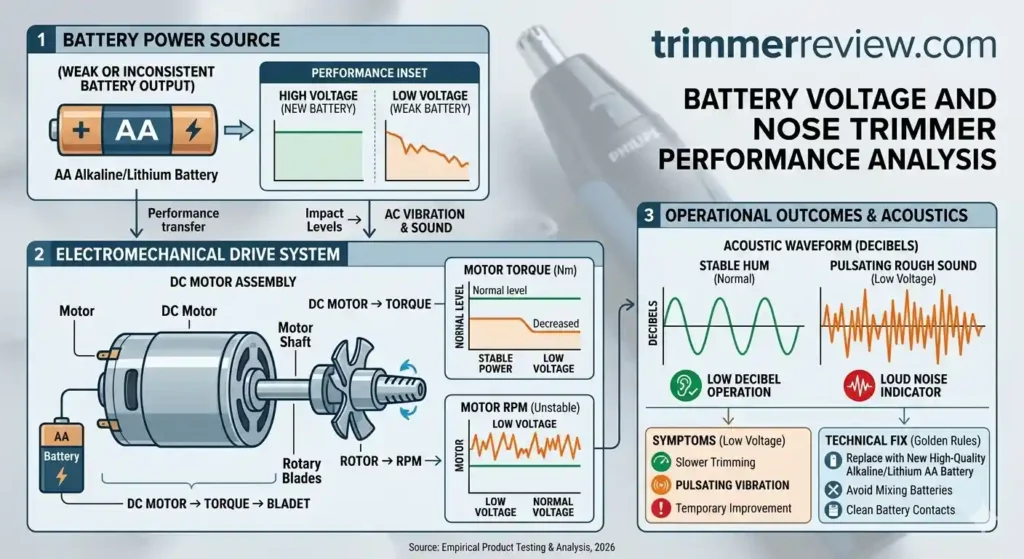
Weak or Inconsistent Battery Output
Most Philips nose trimmers operate on AA batteries.
When voltage drops:
- Motor torque decreases
- RPM becomes unstable
- Sound becomes rough or pulsating
Signs
- Slower trimming
- Pulsating vibration
- Temporary improvement after battery change
Fix
- Replace with a new high-quality alkaline or lithium AA battery.
- Avoid mixing old and new batteries.
- Clean battery contacts if corroded.
Many cases of Philips nose trimmer making loud noise are resolved immediately with a fresh battery.
Internal Motor Wear (End-of-Life Scenario)
All compact DC motors have finite lifespans.
Over time:
- Bearings loosen
- Shaft alignment shifts
- Internal friction increases
This creates consistent loud buzzing that cleaning cannot fix.
Signs
- Device older than 2–3 years
- Noise persists after all fixes
- Noticeable performance drop
- Burning smell or heat in handle
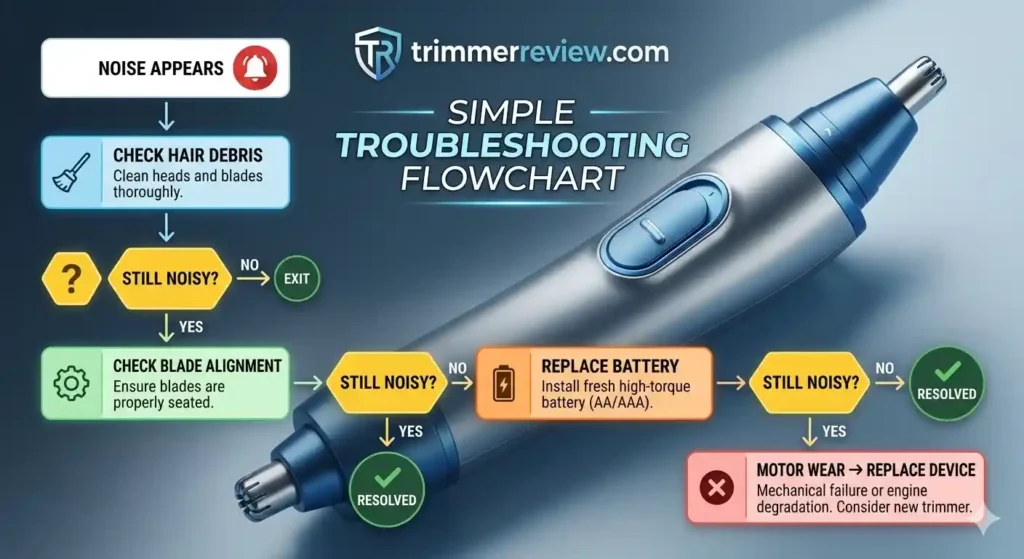
If a Philips nose trimmer making loud noise persists after thorough cleaning, drying, and battery replacement protocols, internal motor wear or bearing fatigue is the highly probable cause.
At this stage, replacement becomes the practical and safer solution.
Consult official service options at: https://www.philips.co.in/c-w/support-home
Decision Framework: Clean, Repair, or Replace?
Here’s the clarity most guides miss:
When to Clean
- Gradual noise increase
- Reduced cutting performance
- Slight vibration
When to Re-seat or Realign
- Sudden rattle after drop
- Head feels loose
- Clicking sound
When to Replace Battery
- Pulsating or whining sound
- Slower motor speed
- Intermittent operation
When Cleaning Will NOT Help
- Persistent loud buzzing
- Burning smell
- Excessive handle heat
- Device older than 3 years
Operating a Philips nose trimmer making loud noise beyond this diagnostic stage may induce excessive mechanical stress on the motor. Adhering to this structured maintenance protocol prevents premature hardware disposal while ensuring operational safety.
Preventive Maintenance Strategy
- Consistent preventive maintenance plays a critical role in preserving the mechanical stability and quiet operation of a nose trimmer. Routine cleaning, proper drying, and periodic inspection reduce internal resistance within the rotary cutting system and help maintain stable motor torque.
- By preventing debris accumulation, moisture retention, and battery instability, users can significantly reduce the likelihood of abnormal noise during operation. Establishing a simple maintenance routine not only improves cutting efficiency but also extends the overall service life of the device.
| Task | Frequency |
|---|---|
| Rinse head | After each use |
| Brush internal guard | Every 2–3 weeks |
| Replace battery | As needed |
| Full inspection | Every 6 months |
Preventive maintenance extends device lifespan and keeps operation quiet.
Common User Mistakes That Can Cause Trimmer Noise
- In many cases, excessive noise in a nose trimmer is not caused by mechanical failure but by improper usage or maintenance habits. Certain common user mistakes can increase friction inside the rotary cutting system, forcing the motor to work harder and produce louder vibrations.
- Understanding these operational errors can help prevent unnecessary troubleshooting and extend the lifespan of the device.
Using a bent or damaged trimming head
Operating the trimmer with a slightly bent or cracked head can disrupt blade alignment and create rattling sounds during operation.
Storing the device while still wet
Placing the trimmer back in storage without proper drying can trap moisture inside the blade chamber, leading to friction and metallic scraping sounds.
Applying thick or unsuitable oils
Using heavy oils such as cooking oil can attract debris and create sticky residue around the blade assembly, increasing mechanical resistance.
Forcing the trimmer against dense hair
- Applying excessive pressure during trimming may push the blades against the protective guard, generating unnecessary vibration and noise.
- Avoiding these common mistakes helps maintain smooth operation and reduces the chances of a nose trimmer developing abnormal noise during regular use.
Final Assessment
A Philips nose trimmer making loud noise is rarely a catastrophic failure. In most cases:
- Deep cleaning restores normal operation
- Proper drying resolves moisture friction
- Battery replacement stabilizes torque
- Re-seating the head fixes alignment issues
Only long-term motor wear requires replacement.
Systematic diagnosis saves money, reduces waste, and extends product life. Philips engineering is built for durability — often the noise is simply a maintenance signal, not a death sentence for the device.
Adhering to these technical protocols ensures a Philips nose trimmer making loud noise can be restored to smooth, quiet operation within minutes. Furthermore, this diagnostic framework enables an objective assessment of when hardware repair is no longer mechanically practical. If performance remains suboptimal after all documented troubleshooting steps, consulting official Philips support resources is the necessary protocol for establishing safe next steps.
Related Guides & Expert Resources
- Philips NT3650/16 vs Philips Norelco NT3600 – Technical breakdown of regional variations.
- Philips Nose Trimmer Series 3000 vs 5000 – Performance and feature-set comparison.
- How to Use a Nose Trimmer (Step-by-Step) – Operational guide for optimal results.
Frequently Asked Questions (FAQs)
Why does the noise increase when applying pressure during use?
This indicates that the cutting blades are being forced against the protective guard. A Philips nose trimmer making loud noise under pressure usually requires better lubrication or a check for bent guard tines that may be touching the blades.
No. Cooking oils (such as olive or vegetable oil) are organic and can become rancid and sticky over time. This will eventually seize the motor and attract more debris. Only pharmaceutical-grade mineral or clipper oil should be used.
Is the loud noise covered under the manufacturer’s warranty?
If the noise is due to a documented manufacturing defect, it is covered. However, noise caused by hair clogs, skin cell accumulation, or lack of cleaning is considered a maintenance issue and is typically not covered under standard warranty terms.
Does the noise indicate that the blades have become blunt?
Bluntness usually manifests as hair pulling or tugging, not excessive noise. Loud noise is almost always a result of mechanical friction, misalignment, or an internal obstruction.
How often should I clean the device to avoid noise?
To prevent a Philips nose trimmer making loud noise, a deep clean is recommended after every three uses.
Can lubrication reduce trimmer noise?
Yes. Proper lubrication can reduce friction between the inner rotary blade and the protective guard. Applying a small drop of clipper-grade mineral oil helps the blades rotate smoothly, minimizes mechanical resistance, and can reduce operational noise while extending blade longevity.
Transparency & Fact-Checking
For full transparency and product information verification details, refer to the Disclaimer & Fact-Checking Policy.
